
SSMS(SQL Server Management Studio)を仕事でよく使うのですが、起動が遅いと感じることが多いです。
なんとか高速化できないかとWeb検索しても解決せず。
フリーソフトの使用が禁止されているので、自分で簡易的にクエリを実行できるアプリを作成してみました。
SELECT/UPDATE/DELETEなど基本的なクエリは動作します。
【開発環境】
.NET Freamwotk4.8
C#7.3
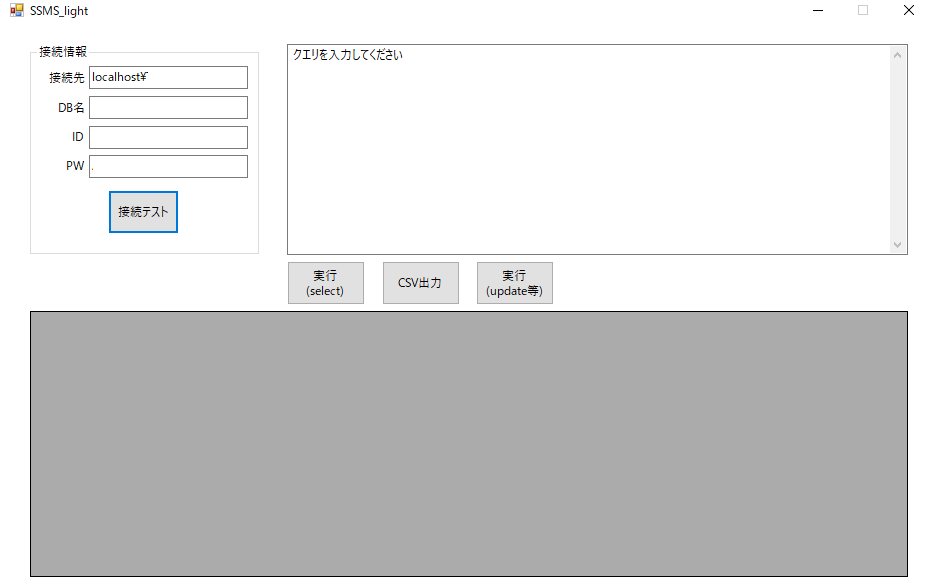
using System;
using System.Data;
using System.Windows.Forms;
namespace ssms_light
{
    public partial class Form1 : Form
    {
        public Form1()
        {
            InitializeComponent();
        }
        private void button3_Click(object sender, EventArgs e)
        {
            //select実行
            DB_Connection DB_Connection = new DB_Connection(this);
            dataGridView1.DataSource = DB_Connection.Select();
        }
        private void button4_Click(object sender, EventArgs e)
        {
            //update実行
            DB_Connection DB_Connection = new DB_Connection(this);
            DB_Connection.Upadte_Insert();
        }
        private void button1_Click(object sender, EventArgs e)
        {
            //CSV出力
            DB_Connection DB_Connection = new DB_Connection(this);
            DB_Connection.CSVOutput(DB_Connection.Select());
        }
        private void button2_Click(object sender, EventArgs e)
        {
            //接続テスト
            DB_Connection DB_Connection = new DB_Connection(this);
            DB_Connection.Test_Connection();
        }
    }
}
using System;
using System.Collections.Generic;
using System.Data;
using System.Data.SqlClient;
using System.Drawing;
using System.IO;
using System.Text;
using System.Windows.Forms;
namespace ssms_light
{
    class DB_Connection
    {
        public Form1 Form1Obj;
        public string SQLStr;
        public SqlConnection SqlConnection1 = new SqlConnection();
        public DB_Connection(Form1 Form1Obj)
        {
            this.Form1Obj = Form1Obj;
            SqlConnectionStringBuilder builder = new SqlConnectionStringBuilder()
            {
                DataSource = Form1Obj.textBox1.Text,
                InitialCatalog = Form1Obj.textBox2.Text,
                UserID = Form1Obj.textBox3.Text,
                Password = Form1Obj.textBox4.Text,
                ConnectTimeout = 5
            };
            SqlConnection1.ConnectionString = builder.ConnectionString;
        }
        //テスト接続
        public void Test_Connection()
        {
            try
            {
                SqlConnection1.Open();
                SqlConnection1.Close();
                MessageBox.Show("正常完了", "接続成功", MessageBoxButtons.OK, MessageBoxIcon.Information);
            }
            catch (Exception E)
            {
                MessageBox.Show(E.Message, "接続失敗", MessageBoxButtons.OK, MessageBoxIcon.Warning);
            }
        }
        //SELECT文実行
        public DataTable Select()
        {
            //クエリ生成
            SQLStr = Form1Obj.textBox5.Text;
            Clipboard.SetText(SQLStr);
            //実行
            SqlConnection1.Open();
            SqlCommand s_command = new SqlCommand(SQLStr, SqlConnection1);
            var reader = new SqlDataAdapter(s_command);
            var dt = new DataTable();
            try
            {
                reader.Fill(dt);
            }
            catch (Exception E)
            {
                MessageBox.Show(E.Message, "エラー発生", MessageBoxButtons.OK, MessageBoxIcon.Warning);
            }
            //リターン
            return dt;
        }
        //UPDATE文実行
        public void Upadte_Insert()
        {
            //クエリ生成
            string SQLStr = Form1Obj.textBox5.Text;
            Clipboard.SetText(SQLStr);
            //実行確認
            DialogResult dr1 = MessageBox.Show("クエリを実行しますか?" , "実行確認", MessageBoxButtons.YesNo);
            if (dr1 == DialogResult.Yes)
            {
                //実行
                SqlConnection1.Open();
                SqlCommand s_command = new SqlCommand(SQLStr, SqlConnection1);
                try
                {
                    int result = s_command.ExecuteNonQuery();
                    //結果表示
                    DialogResult dr2 = MessageBox.Show(result.ToString() + "件処理されました。", "結果", MessageBoxButtons.OK);
                }
                catch (Exception ex)
                {
                    MessageBox.Show(ex.Message, "エラー発生", MessageBoxButtons.OK, MessageBoxIcon.Warning);
                }
                SqlConnection1.Close();
            }
        }
        //CSV出力
        public void CSVOutput(DataTable DataTable)
        {
            SaveFileDialog save = new SaveFileDialog
            {
                Title = "ファイルを保存する",
                InitialDirectory = @"C:\",
                FileName = @"output.csv",
                Filter = "CSV(カンマ付き)|*.csv"
            };
            DialogResult output = save.ShowDialog();
            using (StreamWriter writer = new StreamWriter(save.FileName, false, Encoding.GetEncoding("shift_Jis")))
            {
                int row = DataTable.Rows.Count;
                int colunms = DataTable.Columns.Count;
                List<string> strList = new List<string>();
                for (int k = 0; k < colunms; k++)
                {
                    strList.Add(DataTable.Columns[k].ColumnName.ToString());
                }
                string[] strHeader = strList.ToArray();
                string strCsvData2 = string.Join(",", strHeader);
                writer.WriteLine(strCsvData2);
                for (int i = 0; i < row; i++)
                {
                    strList = new List<string>();
                    for (int j = 0; j < colunms; j++)
                    {
                        strList.Add(DataTable.Rows[i][j].ToString());
                    }
                    string[] strArray = strList.ToArray();
                    string strCsvData = string.Join(",", strArray);
                    writer.WriteLine(strCsvData);
                }
            }
        }
    }
}